引き続き where 句の書き方を学習していきましょう。ここでは is 演算子による条件の指定方法を取り上げます。
is 演算子によって、カラムに対して null 値を比較できます。
where 列名 is nullMySQLでは null は 0 や 空文字とは異なり、データが入力されていないことを意味します。通常の比較演算子 = では null 値を比較できない点に注意してください。
データベースプロダクトによって
nullの扱い方が異なります。MySQLの場合はnullとはデータが入力されていない状態を意味します。データベースプロダクトによっては空文字''データとnull値を区別しないものもあります。
次のSQLは courses テーブルから category_id 列の値が null のレコードを抽出します。
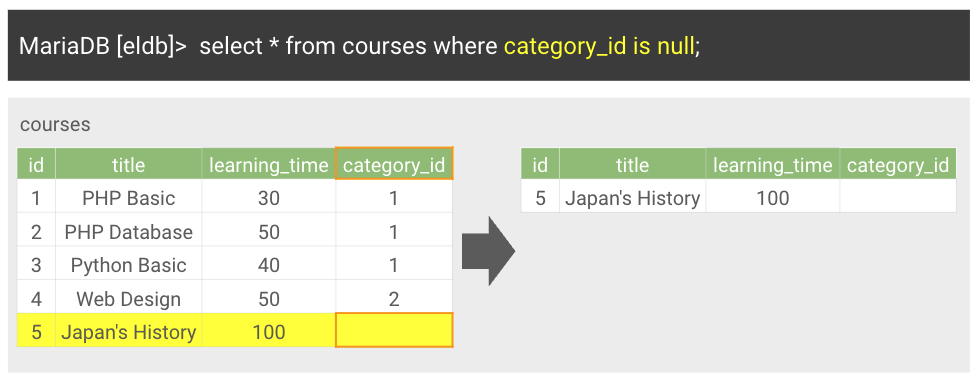
MariaDB [eldb]> select * from courses
    ->          where category_id is null;
+----+-----------------+---------------+-------------+
| id | title           | learning_time | category_id |
+----+-----------------+---------------+-------------+
|  5 | Japan's History |           100 |        NULL |
+----+-----------------+---------------+-------------+
1 row in set (0.00 sec)

MariaDB [eldb]>
null 値以外のレコードを検索する
null 値以外のレコードを抽出する場合は not 演算子を合わせて使います。次のSQLは courses テーブルから category_id 列の値が null でないレコードを抽出します。
MariaDB [eldb]> select * from courses
    ->           where category_id is not null;
+----+--------------+---------------+-------------+
| id | title        | learning_time | category_id |
+----+--------------+---------------+-------------+
|  1 | PHP Basic    |            30 |           1 |
|  2 | PHP Database |            50 |           1 |
|  3 | Python Basic |            40 |           1 |
|  4 | Web Design   |            50 |           2 |
+----+--------------+---------------+-------------+
4 rows in set (0.00 sec)

MariaDB [eldb]>
(参考) = 演算子による null 値の比較
null 演算子は = 演算子で比較できない点も確認しておきましょう。
MariaDB [eldb]> select * from courses
    ->         where category_id = null;
Empty set (0.00 sec)

MariaDB [eldb]>
category_id = null と記述した場合、検索結果は0件となります。このような場合は is 演算子で比較するようにします。